
How to save Instagram reels and find them later in India
You've saved hundreds of reels — recipes, travel spots, workout tips, business ideas. But when you actually need one, it's gone in a bottomless list. Here's how to save Instagram reels the right way in India, so you can find any of them again in seconds.
👉 Short answer: Instagram's built-in “Save” only stacks reels in one long list you can't search by topic. To find them later, save reels to an AI memory app like BhaiFinder — it reads each reel, tags it, and lets you search by meaning (“that paneer recipe reel”) even months later.
The two ways to save an Instagram reel
1. Instagram's own “Save” (quick, but hard to find later)
- Open the reel and tap the bookmark (Save) icon on the right.
- Optionally tap-and-hold Save to add it to a Collection (e.g. “Recipes”).
- Find it later under Profile → menu → Saved.
The catch: even with Collections, you can't search inside your saved reels. You scroll and hope. After a few weeks, that reel is effectively lost.
2. Save to BhaiFinder (so you can actually find it)
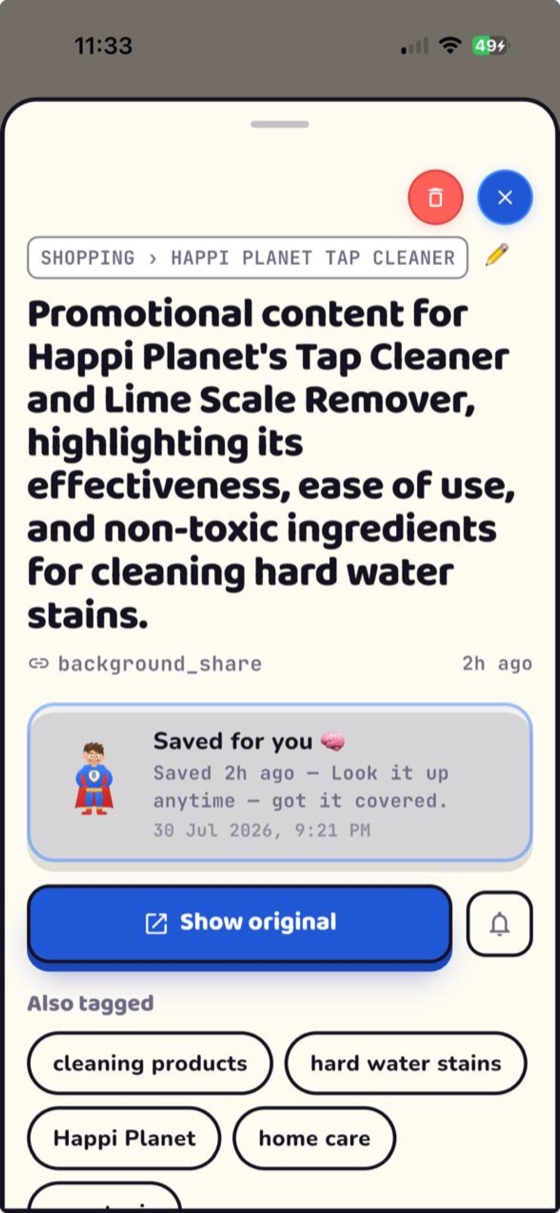
- Tap Share on the reel → pick BhaiFinder. That's it — no typing.
- Bhai reads & sorts it into a category like Food, Travel or Business automatically.
- Search by what you remember — open Find and type “that nihari reel from last month.” Bhai understands the meaning.
- Tap “Show original” to jump straight back to the reel on Instagram.
See it live in the 60-second reel walkthrough.
Why saving to BhaiFinder wins in India

- Search in Hinglish or English — “woh sasti Goa scooter wali reel” works.
- Everything in one place — reels, WhatsApp forwards, YouTube videos, screenshots and links, not scattered across apps.
- Free to start — 20 saves a month on the free plan, on Android and iOS.
- Nudges — Bhai can even remind you to actually try that recipe or watch that saved tutorial.
What else you can save and find
The same trick works beyond reels: links you save on Android, screenshots you take, visiting cards, bills, menus and PDFs. If you can share it, Bhai can remember it.
FAQ
Where do saved Instagram reels go?
Into Instagram's “Saved” section (Profile → menu → Saved), in a reverse-chronological list. There's no search by topic, which is why old reels are hard to find. Saving them to BhaiFinder makes them searchable by content.
How do I find a reel I saved a long time ago?
In Instagram, you have to scroll your entire Saved list. If you saved it to BhaiFinder, just open Find and describe it in your own words — it uses AI to match the meaning, not exact words.
Is there a free app to save reels and find them later in India?
Yes — BhaiFinder is free to start (20 saves/month), works on Android and iOS, and is built for Indian users with Hinglish search.
Can I save reels from WhatsApp and YouTube too?
Yes. Anything shared to you on WhatsApp, or any YouTube video, can be shared to BhaiFinder and found later alongside your reels.
Save a reel once. Find it forever.
BhaiFinder is your AI memory. Free to start on Android & iOS.
Related: Find a reel or screenshot you saved months ago · Best apps to save links on Android · Never lose a visiting card again